ASUS ZenScreen MB166C 15.6" USB-C Portable Monitor Review (2026)
As an Amazon Associate we earn from qualifying purchases. Links on this page are affiliate links.
The ASUS ZenScreen MB166C is the simplest ZenScreen: a 15.6-inch 1080p anti-glare IPS panel that takes picture and power over a single USB-C cable using DP Alt Mode. That one port is the whole story, so it suits laptops whose USB-C outputs video and skips everything else, with no HDMI and no DisplayLink fallback. It weighs 1.72 lb and is about 0.46 inches thick, carries TUV Rheinland flicker-free and low blue light certification, and has a tripod socket on the back plus a foldable sleeve that props it up. Auto-rotate works only on Windows through ASUS DisplayWidget. This review uses ASUS's listing and published specs; we did not test the monitor.
What stands out
- 15.6 in 1080p anti-glare IPS
- Single USB-C input (DP Alt Mode), USB-powered
- 1.72 lb, about 0.46 in thick
- TUV flicker-free and low blue light
- Tripod socket, foldable sleeve-stand
Who it fits
Good fit for
Owners of laptops with video-capable USB-C, such as MacBooks and recent Windows ultrabooks, who want a light screen and one cable.
Who should skip it
Anyone with an older laptop, console or desktop without USB-C video, since the MB166C has no HDMI and no USB-A DisplayLink mode.
Verdict: A light, no-frills USB-C screen; check that your laptop's USB-C carries video before buying.
ASUS MB166C specs explained
USB-C, DP Alt Mode
Your laptop's USB-C port must output DisplayPort video; a data-only port will not work.
USB-powered
The laptop powers the screen over the same cable, so expect extra battery drain.
15.6 in 1920 x 1080 IPS, anti-glare
Matches most 15-inch laptop screens and cuts reflections.
1.72 lb, 14.2 x 8.88 x 0.46 in
About as heavy as a hardcover book; fits a laptop sleeve pocket.
Tripod socket
Mount it on a camera tripod to raise it to eye level.
ASUS MB166C sleeve, socket and eye care
The MB166C ships with a foldable sleeve that protects the screen in a bag and folds into a stand on the desk. A tripod socket in the back lets you use a camera tripod or mini stand instead. The panel has an anti-glare finish and ASUS Eye Care certification from TUV Rheinland for flicker-free backlighting and low blue light. ASUS's DisplayWidget software adds automatic switching between landscape and portrait, but only on Windows, and it needs a driver.
Connecting the ASUS MB166C
Plug one USB-C cable from the laptop to the MB166C and it receives both picture and power. Before buying, look for a DisplayPort or Thunderbolt symbol next to your laptop's USB-C port, or check its specs for DP Alt Mode. Phones and tablets with USB-C video output can work too if they supply enough power. On a Mac, rotate the screen manually in Display settings, since auto-rotate is Windows-only.
ASUS MB166C or ASUS ZenScreen MB16AC
Choose the ASUS MB166C if your laptop has video-capable USB-C and you want the simplest single-cable ZenScreen with a tripod socket. Choose the ASUS MB16AC if you may connect to a laptop with only USB-A ports: it adds a DisplayLink mode for USB-A sources, a smart cover with a pen hole and a stated 3-year warranty, at the same 1.72 lb.
Check before you buy
- Your laptop USB-C port supports DP Alt Mode or Thunderbolt for the MB166C
- You do not need HDMI on the ASUS MB166C
- Your laptop battery can power the MB166C over USB-C
- Auto-rotate on the MB166C matters only if you use Windows
The product at a glance
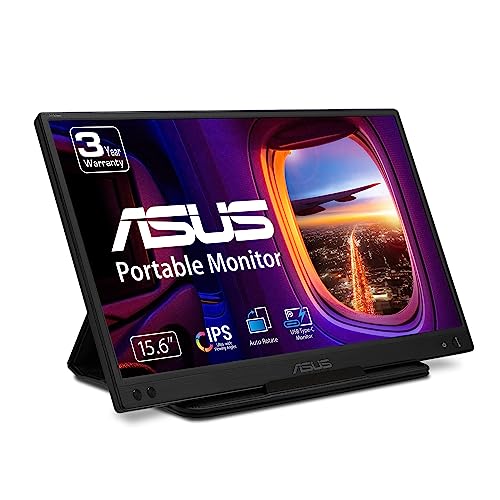
ASUS ZenScreen 15.6-Inch USB-C Monitor
Best for: One-cable USB-C laptops
- Screen Size
- 15.6"
- Resolution
- 1080P
- Panel Type
- IPS
- Connectivity
- USB Type-C
- Weight
- 1.72 pounds
- Dimensions
- 8.88 × 14.2 × 0.46 inches
View on Amazon: ASUS ZenScreen 15.6-Inch USB-C Monitor Affiliate link
ASUS's ZenScreen MB166C is a 15.6-inch 1080p anti-glare IPS monitor powered and fed over a single USB-C cable in DP Alt Mode. It weighs 1.72 lb, has TUV flicker-free and low blue light certification, a tripod socket and a foldable sleeve that doubles as a stand. There is no HDMI.
Pros
- One cable for video and power
- 1.72 lb and slim
- Tripod socket plus sleeve-stand
Cons
- No HDMI input
- Needs USB-C with DP Alt Mode
- Auto-rotate is Windows-only
Good fit if
- Your laptop has video-capable USB-C
- You want a simple travel screen
Skip if
- You use consoles or older laptops
- You want built-in speakers
Verdict: A light, simple USB-C ZenScreen for modern laptops.
Specifications side by side
| Spec | ASUS ZenScreen 15.6-Inch USB-C Monitor |
|---|---|
| Screen Size | 15.6" |
| Resolution | 1080P |
| Panel Type | IPS |
| Connectivity | USB Type-C |
| Weight | 1.72 pounds |
| Dimensions | 8.88 × 14.2 × 0.46 inches |
| Size | 8.9"x14.2"x0.5" |
| Color | BLACK |
| Model | MB166C |
Frequently asked questions
Does the ASUS MB166C have HDMI?
No. The MB166C has one USB-C input that uses DP Alt Mode for video and power.
Will the ASUS MB166C work with a USB-A laptop port?
No. It needs a USB-C port that outputs video; ASUS's MB16AC adds DisplayLink for USB-A sources.
Does the ASUS MB166C need a power adapter?
ASUS lists it as USB-powered, so it draws power from the laptop over the same USB-C cable.
How much does the ASUS ZenScreen MB166C weigh?
1.72 pounds, with a thickness of about 0.46 inches.
Does the ASUS MB166C rotate automatically?
Yes on Windows through DisplayWidget with its driver; auto-rotate does not work on other systems.
Featured in
See also
- asus zenscreen mb169ck p portable monitor review
- asus zenscreen mb16amtr touchscreen monitor review
- asus zenscreen mb16ahv portable monitor review
- asus zenscreen 15 6 1080p portable review
- asus zenscreen mb16acv 15 6 inch 1080p USB c portable monitor review
- ASUS VT229H 22-Inch Class 1080P Touchscreen Monitor Review: A Spec-Based Look
- ASUS ZenScreen MB249C 24-Inch Portable Monitor Review: Specs, Pros and Cons
- ASUS ZenScreen MB16AC 15.6-Inch USB-C Monitor Review: Who It Fits and Who Should Skip It
- asus zenscreen 15 6 inch USB c monitor review
- asus zenscreen mb16acv 15 6 inch review