Best HyperDrive Docking Stations: 3 Models Compared
As an Amazon Associate we earn from qualifying purchases. Links on this page are affiliate links.
Our top Hyper pick is the HyperDrive Thunderbolt 4 Dock (HDTB4D-US): one Thunderbolt cable gives 96W of laptop charging, two Thunderbolt 4 downstream ports, four 10Gbps USB-A ports, 2.5GbE and dual 4K 60Hz video, or one 8K 30Hz or 4K 120Hz screen. We compared 3 HyperDrive docks from their listings and published specs, without hands-on testing.
Choose the HyperDrive Next 10-port business dock if your MacBook has a base M1 or M2 chip and you want two 4K screens, since it uses DisplayLink software. Choose the 14-in-1 Gen 2 dock for the lowest price and a square 3.94-inch footprint with optical audio.
Our top pick: HyperDrive Thunderbolt 4 Dual 6K Dock.
Quick picks
| # | Product | Best for | Price |
|---|---|---|---|
| 1 | HyperDrive Thunderbolt 4 Dual 6K Dock Best overall | Thunderbolt 4 laptops | Check price of HyperDrive Thunderbolt 4 Dual 6K Dock on Amazon |
| 2 | HyperDrive Next 10 Port USB-C Dock Best for base M-series Macs | Base M-series Macs with two monitors | Check price of HyperDrive Next 10 Port USB-C Dock on Amazon |
| 3 | HyperDrive USB-C & Thunderbolt 4 GEN2 14-in-1 Dock for MacBook Pro/Air, iPad, PC - High-Speed Thunderbolt Docking Station - 40Gbps, Gigabit Ethernet, 85W PD Best budget | Small desks and audio setups | Check price of HyperDrive USB-C & Thunderbolt 4 GEN2 14-in-1 Dock for MacBook Pro/Air, iPad, PC - High-Speed Thunderbolt Docking Station - 40Gbps, Gigabit Ethernet, 85W PD on Amazon |
Our 3 picks
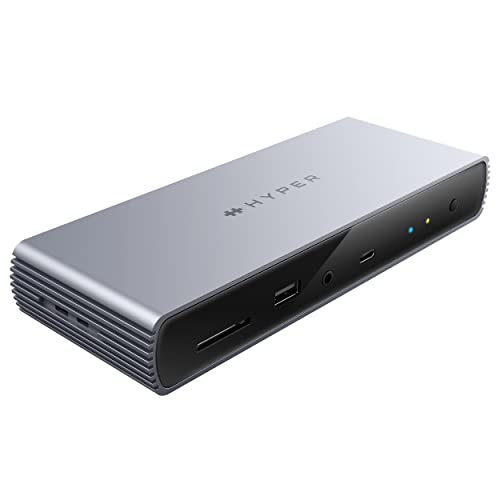
HyperDrive Thunderbolt 4 Dual 6K Dock
Best for: Thunderbolt 4 laptops
- Host Interface
- Thunderbolt 4
- Display Support
- Dual
- Max Resolution
- 8K30Hz
- Power Delivery
- 96W
- Port Count
- 11
- Video Ports
- HDMI, Thunderbolt
View on Amazon: HyperDrive Thunderbolt 4 Dual 6K Dock Affiliate link
The HyperDrive Thunderbolt 4 Dock (HDTB4D-US) has 11 ports: a Thunderbolt 4 upstream port with 96W charging, two 40Gbps Thunderbolt 4 downstream ports, HDMI, four 10Gbps USB-A, 2.5GbE and an audio jack. It runs dual 4K 60Hz, or one 8K 30Hz or 4K 120Hz screen, and weighs 14.2 oz. The title claims dual 6K 60Hz.
Pros
- 96W charging
- Two Thunderbolt 4 downstream ports
- 2.5GbE
Cons
- Title and bullets disagree on 6K
- Most expensive HyperDrive here
Good fit if
- You have a Thunderbolt 4 laptop
- You connect fast external drives
Skip if
- You have a base M1 or M2 Mac and want two screens
- You need SD card slots
Verdict: The most capable HyperDrive dock.

HyperDrive Next 10 Port USB-C Dock
Best for: Base M-series Macs with two monitors
- Host Interface
- USB-C
- Display Support
- Dual
- Max Resolution
- 4K
- Power Delivery
- 85W
- Port Count
- 10
- Video Ports
- HDMI
View on Amazon: HyperDrive Next 10 Port USB-C Dock Affiliate link
The HyperDrive Next 10-port business dock uses DisplayLink software to run two extended 4K screens on base M1 and M2 MacBooks, PCs and Chromebooks. It has 10Gbps USB, an SD 4.0 slot at 312MB/s, HDMI, Ethernet and 100W PD pass-through that delivers up to 85W to the laptop. It weighs 1.76 lb.
Pros
- Two screens on base M1 and M2 Macs
- SD 4.0 card slot
- Mac, Windows and ChromeOS
Cons
- Needs DisplayLink software
- 85W to the laptop
Good fit if
- You have an M1 or M2 MacBook Air
- You import camera cards
Skip if
- You cannot install software
- You need Thunderbolt ports
Verdict: The HyperDrive to buy when your Mac only drives one screen.

HyperDrive USB-C & Thunderbolt 4 GEN2 14-in-1 Dock for MacBook Pro/Air, iPad, PC - High-Speed Thunderbolt Docking Station - 40Gbps, Gigabit Ethernet, 85W PD
Best for: Small desks and audio setups
- Connectivity
- USB-C, Ethernet, Thunderbolt 4
- Port Count
- 14-in-1
- Dimensions
- 3.94 × 3.94 × 1.1 inches
- Weight
- 7.04 ounces
The HyperDrive 14-in-1 Gen 2 dock (HDG2TB314-US) gives 85W to the laptop and has a downstream Thunderbolt port with 15W and DP 1.4 video, 10Gbps USB-A and USB-C, Gigabit Ethernet, coaxial and Toslink audio and a combo jack. It supports dual 4K 60Hz on MST laptops. It is 3.94 inches square and 7.04 oz.
Pros
- Cheapest HyperDrive dock here
- Optical and coaxial audio
- Compact square body
Cons
- Dual 4K needs MST, so one screen on Macs
- Text says Thunderbolt 3 where the title says 4
Good fit if
- You want a small desk dock
- You use digital audio gear
Skip if
- You want two screens on a Mac
- You need 96W or more
Verdict: A compact, low-cost HyperDrive with unusual audio outputs.
Specifications side by side
| Spec | HyperDrive Thunderbolt 4 Dual 6K Dock | HyperDrive Next 10 Port USB-C Dock | HyperDrive USB-C & Thunderbolt 4 GEN2 14-in-1 Dock for MacBook Pro/Air, iPad, PC - High-Speed Thunderbolt Docking Station - 40Gbps, Gigabit Ethernet, 85W PD |
|---|---|---|---|
| Host Interface | Thunderbolt 4 | USB-C | not stated |
| Display Support | Dual | Dual | not stated |
| Max Resolution | 8K30Hz | 4K | not stated |
| Power Delivery | 96W | 85W | not stated |
| Port Count | 11 | 10 | not stated |
| Video Ports | HDMI, Thunderbolt | HDMI | not stated |
| Max Data Speed | 40Gbps | 10Gbps | not stated |
| Ethernet Speed | 2.5 Gigabit | not stated | not stated |
| Connectivity | USB-C, Ethernet, USB-A, Thunderbolt 4 | USB-C | USB-C, Ethernet, Thunderbolt 4 |
| Dimensions | 7.83 × 2.95 × 0.67 inches | 8.54 × 5.08 × 1.57 inches | 3.94 × 3.94 × 1.1 inches |
| Weight | 14.2 ounces | 1.76 pounds | 7.04 ounces |
| Color | Grey | Black | black |
| Model | HDTB4D-US | not stated | HDG2TB314-US |
The HyperDrive docks compared
Thunderbolt 4 Dock HDTB4D-US: 11 ports, 96W, two TB4 downstream, 2.5GbE, 7.83 inches long. Next 10-port business dock: DisplayLink dual 4K, 10Gbps USB, SD 4.0 at 312MB/s, 85W to the laptop from a 100W supply, 1.76 lb. 14-in-1 Gen 2 HDG2TB314-US: 85W upstream, a downstream Thunderbolt port with DP 1.4, 10Gbps USB-A and USB-C, Gigabit Ethernet, coaxial and Toslink audio, 7.04 oz.
Hyper's small USB-C dongles such as the 6-in-2 NET hub are travel adapters rather than desk docks, so they are not ranked here.
Where HyperDrive fits
Hyper designs around Apple laptops first, and it shows in the details: the 14-in-1 has optical and coaxial audio, the Next dock solves the base M1 and M2 one-screen limit with DisplayLink, and the Thunderbolt 4 dock offers 4K 120Hz output. The 14-in-1 is the smallest of the three at 7.04 oz, while the Next business dock is the heaviest at 1.76 lb.
Choosing a HyperDrive dock
-
Base M1 or M2 MacBook
Only the DisplayLink Next dock runs two extended screens on these chips; the Thunderbolt models run one.
-
Charging headroom
The HDTB4D-US delivers 96W, the 14-in-1 and the Next dock 85W; a 16-inch MacBook Pro will charge more slowly on any of them under load.
-
Thunderbolt ports for drives
The HDTB4D-US has two 40Gbps Thunderbolt 4 downstream ports; the 14-in-1 has one downstream Thunderbolt port that also carries video; the Next dock has none.
-
Dual 4K needs MST on the 14-in-1
Hyper notes the 14-in-1's dual 4K 60Hz works on MST-capable laptops, which means Windows, not macOS.
-
The 6K claim on the HDTB4D-US
Its title says dual 6K 60Hz, but the bullet points describe dual 4K 60Hz over HDMI and Thunderbolt; plan on 4K.
Frequently asked questions
Which HyperDrive dock gives an M1 MacBook Air two monitors?
The HyperDrive Next 10-port business dock, after you install the DisplayLink software.
Does the HyperDrive Thunderbolt 4 Dock support 4K 120Hz?
Yes, Hyper lists 8K 30Hz or 4K 120Hz output on the HDTB4D-US.
How much power does the HyperDrive 14-in-1 dock send to a laptop?
85W through its upstream port, with 15W on the downstream Thunderbolt port.
Does the HyperDrive Next dock have an SD card reader?
Yes, an SD 4.0 slot rated at 312MB/s.
Which HyperDrive dock has 2.5 Gigabit Ethernet?
The Thunderbolt 4 Dock HDTB4D-US; the other two have Gigabit Ethernet.