Best Single-Slot Vertical Docking Stations in 2026: 7 Picks Ranked by Specs
As an Amazon Associate we earn from qualifying purchases. Links on this page are affiliate links.
Our top pick for a one-slot vertical docking station is the IVANKY FusionDock 2: it holds one closed MacBook upright, drives two 4K 60Hz HDMI screens on M3, M4 and M5 MacBooks, and is the only MacBook dock here with a 150W adapter in the box. The 7 picks are single-laptop vertical docks ranked from manufacturer listings and published specs, not hands-on testing.
They split by system. TobenONE and PULWTOP BD216C are Windows-only dual-HDMI docks; IVANKY, PULWTOP BD216A, Ascrono and Brydge are built around MacBooks; QUUGE works with both and also lies flat as a laptop riser. Choose the PULWTOP BD216A if you want an M.2 SSD slot for the least money, the Brydge ProDock Duo if you need certified Thunderbolt 4 for a 16-inch MacBook Pro, or the Ascrono if you only want your MacBook Air's own ports passed through to a tidy desk.
Our top pick: iVANKY 12-in-2 Dual Display Dock.
Quick picks
The best fit for you
- A MacBook dock with everything in the box iVANKY 12-in-2 Dual Display Dock 150W adapter, dual 4K 60Hz HDMI, Ethernet and SD/TF.
- A Windows laptop and no spare charger Tobenone Dual Monitor 4K@60Hz Dock 65W adapter and cable included, two HDMI, 10Gbps USB.
- Two monitors and fast USB on Windows PULWTOP Dual 4K Vertical Docking Station Stand MST dual 4K 60Hz, three 10Gbps data ports, Ethernet.
- Extra SSD storage for the least money PULWTOP Vertical USB-C Dock with M.2 Slot M.2 NVMe slot up to 2TB, cheapest pick.
- A dock that also works as a flat laptop riser QUUGE 6-in-1 Dual HDMI Laptop Dock Upright or flat, plus one HDMI 2.1 port for 4K 120Hz on Windows.
- A one-slide cradle for a 15-inch MacBook Air Ascrono Vertical Docking Station for MacBook Air 15" (M2-M5) | 2 USB-C Ports, 140W MagSafe Port, Thunderbolt Compatible up to 40Gbps, One-Slide Dock Passes the Air's USB-C and MagSafe ports to the back.
- Thunderbolt 4 for a 16-inch MacBook Pro Brydge ProDock Duo TB4 MacBook Docking Station, Dual Monitor 4K 60Hz | Vertical Thunderbolt 4 Dock for MacBook Pro 14/16 & Air 13/15 (M1-M5) | 12 Ports, 96W, MagSafe | Pro 16-inch Sleeve 40Gbps, dual 4K 60Hz, 12 ports and an iPhone pad.
Our 7 picks

iVANKY 12-in-2 Dual Display Dock
Best for: MacBook owners who want everything in the box
- Display Support
- Dual
- Max Resolution
- 4K@60Hz
- Power Delivery
- 96W
- Port Count
- 12
- Video Ports
- HDMI
- Max Data Speed
- 5Gbps
View on Amazon: iVANKY 12-in-2 Dual Display Dock Affiliate link
IVANKY's FusionDock 2 (12-in-2) holds one closed MacBook upright and adds two HDMI outputs at 4K 60Hz, four USB 3.0 ports, SD/TF slots and Gigabit Ethernet. It ships with a 150W power adapter, passes up to 96W to the laptop and 18W to a USB-C device, and carries a 24-month warranty.
Pros
- 150W adapter in the box
- Dual 4K 60Hz on M3, M4 and M5 MacBooks
- 96W laptop charging, 24-month warranty
Cons
- Base M1 and M2 MacBooks get one screen
- USB ports top out at 5Gbps
Good fit if
- You dock a MacBook Pro with M-series Pro or Max, M3, M4 or M5 chips
- You want the charger included
Skip if
- Your MacBook has a base M1 or M2 chip and you need two screens
- You need 10Gbps USB
Verdict: The most complete one-slot MacBook dock: charger, two HDMI and Ethernet in one upright stand.

Tobenone Dual Monitor 4K@60Hz Dock
Best for: Windows laptops without a spare charger
- Host Interface
- USB-C, Thunderbolt 3/4, USB4
- Display Support
- Dual
- Max Resolution
- 4K@60Hz
- Port Count
- 11
- Video Ports
- HDMI
- Max Data Speed
- 10Gbps
View on Amazon: Tobenone Dual Monitor 4K@60Hz Dock Affiliate link
TobenONE's 11-in-1 vertical dock holds one Windows laptop on its edge and adds two HDMI ports at 4K 60Hz, 10Gbps USB-C and USB-A 3.2 ports, SD/microSD and an audio jack. A 65W power adapter and a 1 m USB-C cable come in the box. TobenONE lists Windows 10+ and ChromeOS 100+, not macOS.
Pros
- 65W adapter and USB-C cable included
- Two HDMI at 4K 60Hz
- 10Gbps USB-C and USB-A
Cons
- Not for macOS
- No Ethernet port listed
- 65W adapter limits charging for power-hungry laptops
Good fit if
- You run a Dell, HP, Lenovo or Surface laptop
- You want card readers and audio at the desk
Skip if
- You use a MacBook
- You need wired Ethernet
Verdict: A ready-to-plug Windows vertical dock with card readers and its own power supply.
PULWTOP Dual 4K Vertical Docking Station Stand
Best for: Windows dual-monitor desks
- Host Interface
- USB-C
- Display Support
- Dual
- Max Resolution
- 4K@60Hz
- Power Delivery
- 85W
- Port Count
- 11
- Video Ports
- HDMI
View on Amazon: PULWTOP Dual 4K Vertical Docking Station Stand Affiliate link
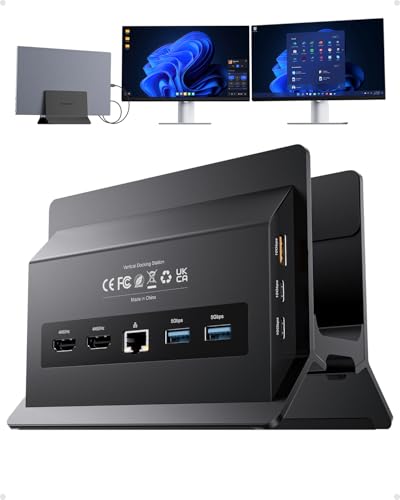
PULWTOP's BD216C (black) is an 11-in-1 vertical dock for Windows laptops: two HDMI at 4K 60Hz through MST, two USB-C 10Gbps data ports, a 10Gbps USB-A, two USB 3.0, USB 2.0 for a mouse, Gigabit Ethernet and 100W PD input that gives 85W to the laptop. No power adapter is included; PULWTOP suggests 65W or more.
Pros
- Two independent 4K 60Hz screens via MST
- Three 10Gbps data ports plus Ethernet
- Works with Thunderbolt 3/4/5 and USB4 Windows laptops
Cons
- Not supported on Mac
- Bring your own 65W+ USB-C charger
- USB-C ports are data only
Good fit if
- You run two monitors from a Windows laptop
- You move big files over 10Gbps USB
Skip if
- You use a MacBook
- You want the charger bundled
Verdict: The port-rich Windows choice when you already own a USB-C charger.

PULWTOP Vertical USB-C Dock with M.2 Slot
Best for: MacBook users short on storage
- Host Interface
- USB-C
- Max Resolution
- 4K@60Hz
- Power Delivery
- 100W
- Port Count
- 11
- Video Ports
- HDMI
- Max Data Speed
- 10Gbps
View on Amazon: PULWTOP Vertical USB-C Dock with M.2 Slot Affiliate link
PULWTOP's BD216A is the cheapest pick here: an 11-in-1 vertical dock with an M.2 NVMe slot (2230 to 2280, up to 2TB at 10Gbps), one HDMI at 4K 60Hz, two USB-C 3.2 10Gbps data ports, two USB-A 5Gbps, SD/TF, Gigabit Ethernet and 100W PD input. It stands the laptop upright or flat; no SSD or charger is included.
Pros
- Built-in M.2 NVMe slot up to 2TB
- Cheapest dock in this group
- Upright or flat placement
Cons
- One HDMI only, no dual monitor
- No SATA SSDs or heatsink drives
- Charger and SSD not included
Good fit if
- You want extra storage on a MacBook
- One external monitor is enough
Skip if
- You need two external screens
- You plan a Mac mini M4
Verdict: A low-cost upright dock that doubles as an SSD enclosure.
QUUGE 6-in-1 Dual HDMI Laptop Dock
Best for: Thin laptops that move between upright and flat
- Slot Count
- 1 Slot (what this guide is about)
- Host Interface
- Thunderbolt 3/4, USB-C
- Display Support
- Dual
- Max Resolution
- 4K@120Hz
- Power Delivery
- 85W
- Port Count
- 6
View on Amazon: QUUGE 6-in-1 Dual HDMI Laptop Dock Affiliate link
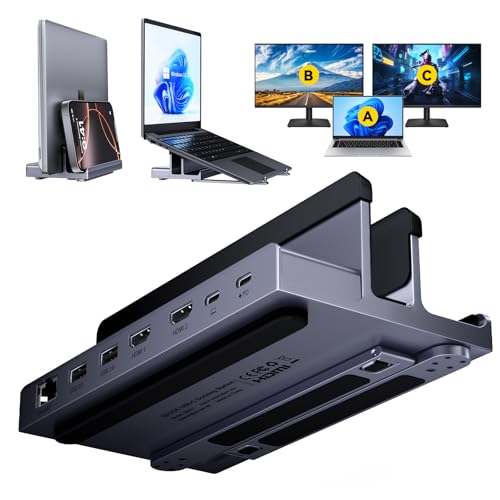
QUUGE's QS601 is a metal stand and 6-port dock in one: use it upright for a closed laptop up to 2 cm thick, or flat to raise the screen. It adds two HDMI (dual 4K 60Hz, or 4K 120Hz on one HDMI 2.1 port on Windows), two USB 3.0 5Gbps, Gigabit Ethernet and 100W PD in with up to 85W to the laptop. Silicone pads protect the laptop.
Pros
- Works upright or flat
- HDMI 2.1 port for 4K 120Hz on Windows
- Silicone-lined metal body
Cons
- Only six ports, no card reader
- Closed laptops must be 2 cm thick or less
- Charger not included
Good fit if
- You switch between upright docking and a raised screen
- You want 4K 120Hz on one monitor
Skip if
- You need USB-C data ports or SD slots
- Your laptop is thicker than 2 cm closed
Verdict: A simple two-position stand dock with the only 4K 120Hz output here.

Ascrono Vertical Docking Station for MacBook Air 15" (M2-M5) | 2 USB-C Ports, 140W MagSafe Port, Thunderbolt Compatible up to 40Gbps, One-Slide Dock
Best for: 15-inch MacBook Air desks
- Connectivity
- USB-C
- Dimensions
- 10 × 2 × 50 inches
Ascrono's DS-L-TF-R1-A3 is a fitted vertical dock for the bare 15-inch MacBook Air (M2 to M5). It has no chips of its own: two USB-C plugs (Thunderbolt compatible, up to 40Gbps) and a MagSafe plug (up to 140W) slide into the MacBook's own ports, so your monitors, hub and Apple charger stay plugged into the back. No drivers are needed.
Pros
- One-slide connection to the MacBook's own ports
- MagSafe pass-through up to 140W
- No drivers or software
Cons
- Fits only the 15-inch MacBook Air, no case
- No ports of its own: bring a hub or adapters
- Most expensive slot dock after the Brydge
Good fit if
- You own a 15-inch MacBook Air and want a clean one-slide desk
- You already have USB-C monitors or a hub
Skip if
- You use a case on your MacBook
- You need HDMI or Ethernet built in
Verdict: A tidy pass-through cradle for one MacBook size, not a port expander.

Brydge ProDock Duo TB4 MacBook Docking Station, Dual Monitor 4K 60Hz | Vertical Thunderbolt 4 Dock for MacBook Pro 14/16 & Air 13/15 (M1-M5) | 12 Ports, 96W, MagSafe | Pro 16-inch Sleeve
Best for: 16-inch MacBook Pro power users
- Resolution
- 4K UHD
- Connectivity
- Thunderbolt 4
- Refresh Rate
- 60Hz
- Display Support
- Dual Monitor
- Dimensions
- 16.2 × 12.5 × 8.6 inches
Brydge's ProDock Duo is a vertical Thunderbolt 4 dock with a sleeve for the 16-inch MacBook Pro. It drives two 4K 60Hz monitors over one 40Gbps cable, charges at up to 96W and adds Thunderbolt 4, USB-A, USB-C, Gigabit Ethernet, an SD reader, a 3.5 mm jack and a MagSafe-compatible iPhone pad, 12 ports in all.
Pros
- Certified Thunderbolt 4, dual 4K 60Hz
- MagSafe-compatible iPhone pad on the stand
- Protective sleeve included
Cons
- 96W can fall short of a 16-inch Pro under full load
- Highest price in this group
- Sleeve is sized for one MacBook model
Good fit if
- You dock a 16-inch MacBook Pro daily
- You want an iPhone charging spot too
Skip if
- You use a Windows laptop
- Your budget is under $200
Verdict: The premium Thunderbolt 4 choice for a 16-inch MacBook Pro.
Specifications side by side
| Spec | iVANKY 12-in-2 Dual Display Dock | Tobenone Dual Monitor 4K@60Hz Dock | PULWTOP Dual 4K Vertical Docking Station Stand | PULWTOP Vertical USB-C Dock with M.2 Slot | QUUGE 6-in-1 Dual HDMI Laptop Dock | Ascrono Vertical Docking Station for MacBook Air 15" (M2-M5) | 2 USB-C Ports, 140W MagSafe Port, Thunderbolt Compatible up to 40Gbps, One-Slide Dock | Brydge ProDock Duo TB4 MacBook Docking Station, Dual Monitor 4K 60Hz | Vertical Thunderbolt 4 Dock for MacBook Pro 14/16 & Air 13/15 (M1-M5) | 12 Ports, 96W, MagSafe | Pro 16-inch Sleeve |
|---|---|---|---|---|---|---|---|
| Host Interface | not stated | USB-C, Thunderbolt 3/4, USB4 | USB-C | USB-C | Thunderbolt 3/4, USB-C | not stated | not stated |
| Display Support | Dual | Dual | Dual | not stated | Dual | not stated | not stated |
| Max Resolution | 4K@60Hz | 4K@60Hz | 4K@60Hz | 4K@60Hz | 4K@120Hz | not stated | not stated |
| Power Delivery | 96W | not stated | 85W | 100W | 85W | not stated | not stated |
| Port Count | 12 | 11 | 11 | 11 | 6 | not stated | not stated |
| Video Ports | HDMI | HDMI | HDMI | HDMI | HDMI | not stated | not stated |
| Max Data Speed | 5Gbps | 10Gbps | 10Gbps | 10Gbps | 5Gbps | not stated | not stated |
| Ethernet Speed | 1 Gbps | not stated | Gigabit | Gigabit | 1Gbps | not stated | not stated |
| Resolution | 4K UHD | 4K UHD | 4K UHD | 4K UHD | 4K UHD | not stated | 4K UHD |
| Connectivity | USB-C, HDMI, Ethernet | HDMI, USB-A | USB-C, Ethernet | USB-C, HDMI, Ethernet, USB-A | USB-C, HDMI, Ethernet | USB-C | Thunderbolt 4 |
| Refresh Rate | not stated | not stated | 60Hz | 60Hz | 120Hz | not stated | 60Hz |
| Features | Kickstand | not stated | Kickstand | not stated | Kickstand | not stated | not stated |
| Use | not stated | not stated | Office | not stated | not stated | not stated | not stated |
| Recommended Use | not stated | not stated | Home | not stated | not stated | not stated | not stated |
| Slot Count | not stated | not stated | not stated | not stated | 1 Slot | not stated | not stated |
| Dimensions | not stated | 7.64 × 3.15 × 2.95 inches | 5.91 × 4.53 × 4.13 inches | 5.91 × 4.57 × 2.56 inches | 7.09 × 3.82 × 2.36 inches | 10 × 2 × 50 inches | 16.2 × 12.5 × 8.6 inches |
| Weight | not stated | 2.27 pounds | not stated | 1.63 pounds | 1.39 pounds | not stated | not stated |
| Size | 12-in-2 | not stated | not stated | not stated | 6-in-1 2×HDMI+RJ45+2×USB3.0+PD | 15" MacBook Air (2023-2026) | Macbook Pro 16-Inch |
| Color | Sliver | Grey | Black | Black-Vertical Docking Station | grey | Space Grey | Space Grey |
| Model | not stated | not stated | BD216C | BD216A-Black | QS601 | DS-L-TF-R1-A3 | not stated |
How to pick a one-slot vertical dock
-
Check your operating system first
TobenONE and PULWTOP BD216C say they do not support macOS; IVANKY, Ascrono and Brydge are MacBook docks. PULWTOP BD216A and QUUGE list both MacBooks and USB-C Windows laptops.
-
Count screens against your chip
Base M1 and M2 MacBooks drive one external screen, so IVANKY, Brydge and TobenONE's dual HDMI only pays off on Pro/Max chips or M3 and later. On Windows, PULWTOP BD216C uses MST for two independent 4K 60Hz screens.
-
Measure the laptop
QUUGE takes closed laptops up to 2 cm thick. Ascrono and Brydge are shaped for one MacBook size (15-inch Air and 16-inch Pro here), and Ascrono needs the bare laptop without a case.
-
Plan the power
Docks without a charger need a USB-C PD adapter of 65W or more; they pass about 85W to the laptop. A 16-inch MacBook Pro can draw more than 96W under load, which is why Brydge suggests keeping Apple's 140W charger for heavy work.
-
Decide on storage
PULWTOP BD216A takes an M.2 NVMe SSD (2230 to 2280, up to 2TB) but not SATA drives or SSDs with heatsinks; none of the other docks here has a drive slot.
Frequently asked questions
Which one-slot vertical dock includes a power adapter?
IVANKY's FusionDock 2 ships with a 150W adapter and TobenONE's 11-in-1 vertical dock with a 65W adapter; the PULWTOP and QUUGE docks need your own charger.
Which vertical dock works with both a MacBook and a Windows laptop?
PULWTOP BD216A and QUUGE QS601 list both. TobenONE and PULWTOP BD216C are Windows-only, and IVANKY, Ascrono and Brydge are MacBook docks.
Can a base M1 or M2 MacBook run two monitors from these docks?
No. IVANKY, Brydge and TobenONE all note that base M1 and M2 MacBooks support one external display.
Does the Ascrono vertical dock add ports?
No. It routes the MacBook Air's two USB-C ports and MagSafe to the back of the dock, so you plug in your own monitor, hub and Apple charger once.
Which vertical dock has an SSD slot?
PULWTOP BD216A, with an M.2 NVMe slot for 2230 to 2280 drives up to 2TB at 10Gbps.