KEFEYA P7 15.6" Triple Laptop Screen Extender Review: Specs, Pros and Cons
As an Amazon Associate we earn from qualifying purchases. Links on this page are affiliate links.
The KEFEYA P7 adds two 15.6-inch 1080p IPS screens around a 12 to 17.3-inch laptop, and its key difference from clip-on extenders is the freestanding aluminum frame: it stands on three rubber pads behind the laptop, so none of its 3.9 lb hangs on the laptop lid. It needs no driver; each screen takes its own video cable, either two full-featured USB-C cables, USB-C plus HDMI with the power adapter, or two HDMI cables with power. KEFEYA lists 100% sRGB, 1000:1 contrast, anti-glare panels, a 0-180 degree screen tilt and a 0-90 degree stand. We looked at it through KEFEYA's listing and published specs, not by using it.
What stands out
- Two 15.6 in 1080p IPS panels, 100% sRGB
- Freestanding frame, 12-17.3 in laptops
- No driver: two USB-C, USB-C + HDMI or two HDMI
- Screens tilt 0-180 degrees, stand 0-90 degrees
- 3.9 lb, 0.16 in panels, leather bag
Who it fits
Good fit for
Windows laptops and Pro/Max MacBooks with two video-capable ports, where a driver-free link matters more than a single cable.
Who should skip it
M1, M2, M3 or A18 Pro base MacBooks (KEFEYA says they need an H6 hub that is not included), and laptops with only one video output.
Verdict: A driver-free freestanding triple that keeps weight off the laptop, if your laptop has two video ports.
KEFEYA P7 specs explained
2 x 15.6 in 1920 x 1080 IPS
Two full-size side screens with anti-glare coating and 178-degree viewing.
100% sRGB, 1000:1, HDR
Standard color coverage for office work and photos.
Two video inputs, no driver
Each screen needs its own USB-C or HDMI signal; HDMI connections also need the adapter.
Freestanding, 12-17.3 in laptops
The frame stands behind the laptop on rubber pads rather than gripping the lid.
3.9 lb, 0.87 in folded
Each panel is 0.16 in thick; a leather carry bag comes with it.
P7 frame and stand
KEFEYA builds the P7 from aluminum alloy with a fingerprint- and scratch-resistant finish. The frame stands freely on three anti-slip rubber pads, so it does not clamp or hook onto the laptop screen, and it fits laptops from 12 to 17.3 inches. Each screen tilts from 0 to 180 degrees and the stand opens from 0 to 90 degrees. The whole unit folds to 0.87 inches and weighs 3.9 lb, which KEFEYA claims is the lightest among 15.6-inch triple extenders.
Connecting the KEFEYA P7
The P7 runs without a driver, but each screen needs its own video source: two full-featured USB-C cables, one USB-C plus one HDMI with the power adapter, or two HDMI cables with power. KEFEYA says M1, M2, M3 and A18 Pro base MacBooks need an H6 hub (not included), while Pro and Max chips and M4 and M5 models plug in directly. If a screen flickers or looks dim, KEFEYA recommends a 5V 3A or stronger adapter. With your own 65W or larger PD charger plugged into the P7, it can charge the laptop over USB-C; HDMI ports do not pass power.
KEFEYA P7 or Anyking P7 Pro
Choose the KEFEYA P7 if your laptop has two USB-C or HDMI video ports and you want a driver-free setup. Choose the Anyking P7 Pro if your laptop has only one full-featured USB-C port or you use a base M1-M3 Mac: one cable runs both 15.6-inch screens, but you must install its display driver first.
Check before you buy
- Your laptop has two video outputs for the KEFEYA P7
- Your laptop is 12 to 17.3 inches for the KEFEYA frame
- You have a 5V 3A adapter for stable KEFEYA P7 brightness
- A base M1-M3 MacBook needs an H6 hub with the P7
The product at a glance
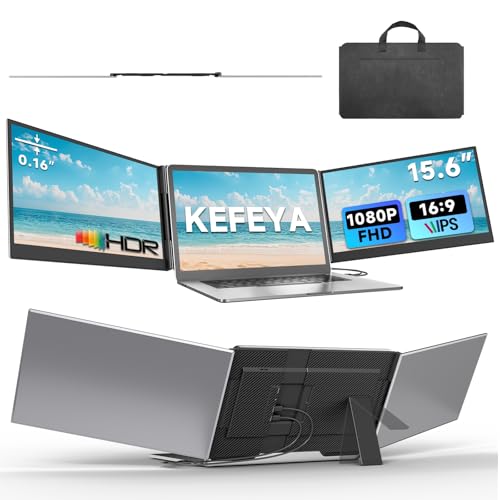
KEFEYA 15.6" Triple Portable Monitor
Best for: Two-port laptops wanting a triple setup
- Screen Size
- 15.6"
- Resolution
- 1920x1080
- Panel Type
- IPS
- Connectivity
- USB-C, HDMI
- Color Gamut
- 100% sRGB
- Aspect Ratio
- 16:9
View on Amazon: KEFEYA 15.6" Triple Portable Monitor Affiliate link
KEFEYA's P7 is a freestanding aluminum triple-screen extender with two 15.6-inch 1080p IPS panels (100% sRGB) for 12-17.3 inch laptops. It needs no driver but uses one video cable per screen (USB-C or HDMI), weighs 3.9 lb and ships with a leather bag; base M1-M3 Macs need an H6 hub.
Pros
- Freestanding frame, no weight on the lid
- No driver
- USB-C or HDMI per screen
Cons
- Needs two video outputs
- Base M1-M3 Macs need a hub
- May need a 5V 3A adapter
Good fit if
- Your laptop has two video ports
- You want the KEFEYA screens off the lid
Skip if
- You have a base M1-M3 MacBook
- You want one-cable setup
Verdict: A sturdy driver-free triple for laptops with spare video ports.
Specifications side by side
| Spec | KEFEYA 15.6" Triple Portable Monitor |
|---|---|
| Screen Size | 15.6" |
| Resolution | 1920x1080 |
| Panel Type | IPS |
| Connectivity | USB-C, HDMI |
| Color Gamut | 100% sRGB |
| Aspect Ratio | 16:9 |
| Weight | 4 pounds |
| Features | HDR |
| Use | Travel |
| Display Support | Triple Monitor |
| Size | 17.3 Inch |
| Dimensions | 15 × 0.87 × 9.39 inches |
| Color | Black |
| Model | P7 |
Frequently asked questions
Does the KEFEYA P7 need a driver?
No. It is plug and play, but each screen needs its own USB-C or HDMI video connection.
Does the KEFEYA P7 work with an M1 MacBook Air?
KEFEYA says base M1, M2, M3 and A18 Pro MacBooks need an H6 hub, which is not included.
Does the KEFEYA P7 clip onto the laptop?
No, it is freestanding on three rubber pads and fits laptops from 12 to 17.3 inches.
How heavy is the KEFEYA P7?
3.9 pounds, with 0.16-inch panels.
Can the KEFEYA P7 charge my laptop?
Yes over USB-C when your own 65W or stronger PD charger powers it; HDMI does not carry power.
Featured in
See also
- anyuse pm156 15 6 inch 4k portable monitor review
- yxk y140f1 14 inch 1200p ips portable monitor review
- ahxjka 14 inch portable touchscreen monitor review
- kefeya laptop screen extender review
- kefeya laptop screen extender 14 2 review
- KEFEYA S8 14-Inch Ultra-Thin Laptop Screen Extender Review: Who It Fits and Who Should Skip It
- synnov 15 6 laptop screen extender review
- hp 15 6 laptop review