MOKiN 6-in-1 Dual HDMI USB-C Docking Station Review: Who It Fits and Who Should Skip It
As an Amazon Associate we earn from qualifying purchases. Links on this page are affiliate links.
The MOKiN 6-in-1 is a palm-size USB-C dock built to add two HDMI monitors to a Windows laptop. Both HDMI ports are listed at 4K 60Hz and can run at the same time; with MST you can extend different content to each screen, so the laptop panel plus two monitors gives three displays. It also has one fast USB port, two USB 2.0 ports for a keyboard and mouse, and a 100W PD charging input. MOKiN states that macOS does not support its MST mode, so a MacBook only mirrors. The listing gives no model number and calls the fast port both USB 3.1 and USB 3.0, at 10Gbps. This review is based on MOKiN's listing, not hands-on testing.
What stands out
- Two HDMI outputs, both up to 4K 60Hz
- MST extend on Windows: laptop plus two monitors
- 100W PD input for laptop charging
- One 10Gbps USB plus two USB 2.0
- Driverless, about 2 x 2 x 1 inches, 2.72 oz
Who it fits
Good fit for
Owners of Windows laptops such as the Dell XPS 13/15, Surface Laptop 3 or Lenovo Yoga models it lists, who want two extended HDMI monitors from one USB-C port and little else.
Who should skip it
MacBook users (mirror mode only), anyone who needs Ethernet, card readers or several fast USB ports, and buyers who need a listed charging figure for the laptop side.
Verdict: A cheap, tiny way to get two extended HDMI monitors on Windows; skip it for a Mac or a fuller desk setup.
MOKiN 6-in-1 dual HDMI specs
2 x HDMI, 4K 60Hz
Two external monitors at once; MOKiN also lists 1080p 60Hz for lower-resolution screens.
SST and MST
MST lets Windows extend different windows to each monitor; Macs only clone the image.
1 x USB 10Gbps
One port for an SSD or phone; the listing names it USB 3.1 and USB 3.0 in different bullets.
2 x USB 2.0
480Mbps ports for keyboard, mouse or receiver.
100W PD charging port
Plug in your USB-C charger to power the laptop through the dock; the share used by the dock is not stated.
2.72 oz, about 2 x 2 x 1 inches
Small enough to stay in a laptop bag.
MOKiN 6-in-1 build
The listing shows a grey square body about 2 inches on each side and 1 inch thick, weighing 2.72 oz, with no model code. MOKiN describes an advanced chip that supports both SST and MST, and the dock needs no drivers or software. There is no Ethernet, SD reader, audio jack or DisplayPort, so it is a monitor adapter with a few USB ports rather than a full desk dock.
Using the MOKiN dock with two monitors
Connect your USB-C charger to the PD port, then plug the dock into a USB-C port that carries DisplayPort video. In Windows display settings, choose Extend for each HDMI monitor to spread work across three screens; Collage mode spans one picture across two. On a MacBook both monitors show the same image. Use the 10Gbps port for storage and the USB 2.0 ports for input devices.
MOKiN 6-in-1 or NOVOO 15-in-1
Choose the MOKiN 6-in-1 if you only need two HDMI monitors on Windows plus a fast USB port in the smallest, cheapest body. Choose the NOVOO 15-in-1 if you also need VGA, Ethernet, SD/TF, an audio jack and more USB ports; NOVOO's USB ports run at 5Gbps and it adds a screen-off privacy button.
Check before you buy
- Your MOKiN target is a Windows laptop with DP Alt Mode USB-C
- Two HDMI monitors are all you plan to add with the MOKiN
- One fast USB port covers your drives on the MOKiN
- You can live without Ethernet on the MOKiN
The product at a glance
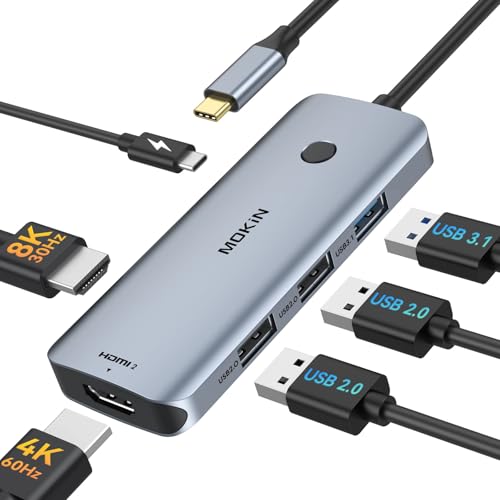
MOKiN 6-in-1 Dual HDMI USB-C Hub
Best for: Windows ultrabooks with two monitors
- Host Interface
- USB-C
- Display Support
- Dual
- Max Resolution
- 4K@60Hz
- Power Delivery
- 100W
- Port Count
- 6
- Video Ports
- HDMI
View on Amazon: MOKiN 6-in-1 Dual HDMI USB-C Hub Affiliate link
MOKiN's 6-in-1 USB-C dock adds two HDMI ports (4K 60Hz each, MST extend on Windows), one 10Gbps USB, two USB 2.0 and a 100W PD input, in a 2.72 oz body without drivers. Macs mirror only.
Pros
- Two extended HDMI monitors on Windows
- Very small and light
- Driverless MST
Cons
- Mirror only on macOS
- No Ethernet, card reader or audio
- Model code not listed
Good fit if
- You want two HDMI monitors from a Windows ultrabook
- You travel with the dock
Skip if
- You use a MacBook
- You need a wired network port
Verdict: A tiny dual-HDMI adapter for Windows laptops.
Specifications side by side
| Spec | MOKiN 6-in-1 Dual HDMI USB-C Hub |
|---|---|
| Host Interface | USB-C |
| Display Support | Dual |
| Max Resolution | 4K@60Hz |
| Power Delivery | 100W |
| Port Count | 6 |
| Video Ports | HDMI |
| Max Data Speed | 10Gbps |
| Resolution | 4K UHD |
| Connectivity | USB-C, HDMI |
| Refresh Rate | 60Hz |
| Dimensions | 2 × 1 × 2 inches |
| Weight | 2.72 ounces |
| Size | 6-in-1 |
| Color | Grey |
Frequently asked questions
Does the MOKiN 6-in-1 dual HDMI dock extend two screens on a MacBook?
No. MOKiN says macOS does not support its MST function, so a Mac mirrors the same image to both monitors.
What resolution do the MOKiN 6-in-1 HDMI ports support?
Up to 4K 60Hz on each HDMI port, used at the same time.
How fast is the MOKiN 6-in-1 USB port?
One port is listed at 10Gbps; the two others are USB 2.0 at 480Mbps.
Does the MOKiN 6-in-1 have an Ethernet port?
No. Its six ports are two HDMI, one fast USB, two USB 2.0 and the PD charging input.
Which laptops does MOKiN list for this 6-in-1 dock?
Dell XPS 13/15, Lenovo Yoga 720/910/920/930, Surface Book 2, Surface Go, Surface Laptop 3 and Dell Latitude 13 7000.
Featured in
See also
- lionwei 13 in 1 USB c docking station review
- selore 8 in 1 quad video USB c dock silver review
- ivanky fusiondock 1 plus macbook dock review
- mokin macbook pro docking station review
- mokin USB c docking station review
- MOKiN 13-in-1 Triple Display USB-C Docking Station (0231) Review: A Spec-Based Look
- MOKiN 13-in-1 USB-C Triple Display Docking Station Review: Who It Fits
- tesmart USB c hdmi review
- joiot 32gb dual USB c USB a review