Selore 8-in-1 USB-C Dock with Dual HDMI, DP and VGA Review (2026): A Spec-Based Look
As an Amazon Associate we earn from qualifying purchases. Links on this page are affiliate links.
The Selore 8-in-1 is a compact USB-C dongle with four video outputs, and its draw is lots of screens for little money on Windows: two HDMI (one 4K 60Hz, one 4K 30Hz), a 4K 60Hz DisplayPort and a 1080p VGA port. Selore's own wording varies between three and four monitors, so plan on three extended screens and check with Selore for a fourth. It passes up to 100W through its PD port from your own charger and adds two USB 2.0 ports and a USB-C 2.0 port. On a MacBook the screens mirror, so all show the same picture, and a VGA screen on a Mac can hold every display to 1080p 60Hz. It weighs 3.17 oz and carries an 18-month warranty. We based this review on Selore's listing and published specs, not on hands-on use.
What stands out
- 2 x HDMI (4K 60Hz + 4K 30Hz), 4K 60Hz DP, 1080p VGA
- 100W PD pass-through
- 2 x USB 2.0, 1 x USB-C 2.0
- 3.17 oz dongle, 4.5 x 2 x 0.62 in
- 18-month warranty
Who it fits
Good fit for
Windows laptop users with a mix of older and newer monitors, including VGA, who want several screens from one small dongle at a low price.
Who should skip it
Mac users who want extended screens, anyone needing fast USB data or Ethernet, and people who want every screen at 4K 60Hz.
Verdict: A cheap multi-screen dongle for Windows desks with mixed monitors; Macs only mirror.
Selore 8-in-1 outputs explained
HDMI 1: 4K 60Hz, HDMI 2: 4K 30Hz
Use the 60Hz port for the main screen; 30Hz is fine for static documents.
DisplayPort 4K 60Hz
A second full-rate output for a DP monitor.
VGA 1080p
Keeps an older projector or monitor in use.
MacBook: mirror only
Every screen shows the same desktop on macOS.
100W PD in
Plug your laptop charger into the dongle to charge while docked; match the original charger's wattage.
USB 2.0 (480Mbps)
Fine for keyboard and mouse, slow for drives.
Selore 8-in-1 size and build
The Selore is a gray dongle about 4.5 by 2 by 0.62 inches and 3.17 oz, small enough for a laptop bag pocket. It has no power adapter of its own; the PD port takes your laptop charger. There is no Ethernet port and no card reader, and all USB data ports run at USB 2.0 speed. Selore sells the same dongle in silver.
Running several screens from the Selore
Plug the dongle into a full-function USB-C, Thunderbolt 3/4 or USB4 port that supports video, connect the laptop charger to the PD port, then attach monitors. On Windows, put the main monitor on HDMI 1 or DisplayPort for 60Hz and use HDMI 2 or VGA for reference screens. On a Mac, expect mirrored screens, and leave the VGA port empty to keep the others above 1080p. Selore warns that a lower-power charger may trigger a system warning.
Selore 8-in-1 or WAVLINK UG77PD1 (SM770)
Choose the Selore 8-in-1 if you run Windows, want VGA for an older display, and want several screens from a pocket-size dongle at a fraction of a full dock's price. Choose the WAVLINK UG77PD1 if you use a MacBook and need three extended 4K 60Hz screens, plus 2.5GbE and 10Gbps USB, and can install its SMI driver.
Check before you buy
- You use Windows, since Macs only mirror through the Selore
- Your laptop's USB-C supports video and PD for the Selore dongle
- USB 2.0 speed on the Selore is enough for your keyboard and mouse
- Your main monitor goes on the Selore's 60Hz HDMI or DP port
The product at a glance
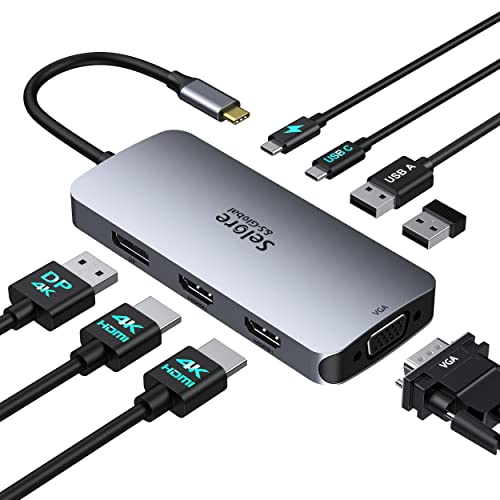
Selore 8-in-1 Triple Display USB-C Dock
Best for: Budget multi-screen on Windows
- Host Interface
- USB-C
- Display Support
- Quad
- Max Resolution
- 4K@60Hz
- Power Delivery
- 100W
- Video Ports
- HDMI, DisplayPort, VGA
- Connectivity
- USB-C, HDMI, DisplayPort, VGA
View on Amazon: Selore 8-in-1 Triple Display USB-C Dock Affiliate link
Selore's 8-in-1 USB-C dongle has two HDMI (4K 60Hz and 4K 30Hz), a 4K 60Hz DisplayPort, a 1080p VGA port, 100W PD pass-through, two USB 2.0 and a USB-C 2.0 port, at 3.17 oz. Windows extends the screens; Macs mirror. Warranty is 18 months.
Pros
- Four video outputs including VGA
- 100W PD pass-through
- Pocket-size, low price
Cons
- Macs mirror only
- One HDMI limited to 30Hz
- USB 2.0 data, no Ethernet
Good fit if
- You use Windows with mixed monitors
- You still use a VGA display
Skip if
- You need extended screens on a Mac
- You move large files over USB
Verdict: A low-cost multi-screen dongle for Windows.
Specifications side by side
| Spec | Selore 8-in-1 Triple Display USB-C Dock |
|---|---|
| Host Interface | USB-C |
| Display Support | Quad |
| Max Resolution | 4K@60Hz |
| Power Delivery | 100W |
| Video Ports | HDMI, DisplayPort, VGA |
| Resolution | 4K UHD |
| Connectivity | USB-C, HDMI, DisplayPort, VGA |
| Port Count | 8-in-1 |
| Dimensions | 4.5 × 2 × 0.62 inches |
| Weight | 3.17 ounces |
| Color | Gray |
| Model | Docking Station Dual HDMI Monitor |
Frequently asked questions
Can the Selore 8-in-1 extend three screens on a MacBook?
No, Selore says MacBooks mirror, so extended screens show the same content.
What refresh rates do the Selore HDMI ports support?
One HDMI runs 4K at 60Hz and the other 4K at 30Hz; the DisplayPort runs 4K 60Hz.
Does the Selore dock charge my laptop?
Yes, through its PD port at up to 100W from your own charger.
Why are my screens limited to 1080p on a Mac with the Selore?
Selore notes that connecting a VGA display to a Mac can limit all screens to 1080p 60Hz.
How fast are the USB ports on the Selore 8-in-1?
USB 2.0, up to 480Mbps.
Featured in
See also
- anker 5 in 1 USB c hub 4k review
- anker 565 11 in 1 dual display review
- anker 8 in 1 USB c hub a8379 triple display review
- selore s global USB c adapter macbook review
- selore s global selore USB c docking review
- Selore UE106+ 12-in-1 Triple HDMI Docking Station Review: Specs, Pros and Cons
- Selore 16-in-1 Triple HDMI Docking Station Review: Who It Fits and Who Should Skip It
- Selore 8-in-1 Quad Video USB-C Dock (Silver) Review: Specs, Pros and Cons
- global 8 inch stainless steel chef s review
- akeydiy professional 8 in 1 review